Korea SIM card, eSIM or pocket Wi-Fi? What each one gets you, when a Korean number matters for clinics and apps, passport checks, and prices as of Oct 2026.
PK
Peep Korea Editorial · 15 min read
Short answer
For most visitors an unlimited-data eSIM from a Korean carrier, installed before the flight, is the simplest pick; a physical SIM suits phones without eSIM, and pocket Wi-Fi suits groups sharing one connection.1, 2, 5 If a clinic will call you, or you want app sign-ups that send a text code, buy a data plus voice plan with an 010 number and finish the passport check.3, 4, 5 As of Oct 2026, carrier list prices run from about 6,500 won for one day to about 71,500 won for 30 days of data.3, 5
The mistake is not paying too much. It is landing with perfect data and no way for anyone in Korea to reach you.
If you remember one test, remember this. Ask: "Will someone in Korea need to call or text me?" If yes, data only is the wrong product.
Which SIM card should a tourist buy in Korea?
Buy one from a Korean carrier's official tourist page or counter, and pick it by what you need: data only, or data plus a Korean number. SK Telecom, KT and LG U+ all sell tourist plans as a physical SIM or an eSIM, and all three run counters at the main airports.1
You want
Pick
Why
Maps, chat and photos only
Data-only eSIM
Lowest price, nothing to collect, works on landing
Clinic calls, delivery apps, text codes
Data + voice plan with an 010 number
Incoming calls and texts work after a passport check
A phone with no eSIM
Physical SIM
Pick up at an airport counter or some convenience stores
Two or more people, laptops
Pocket Wi-Fi
One device, several screens, one bill
A few days, little data
Home roaming
No setup, but billed per day
Plan types from the carriers' official tourist pages, checked Oct 2026.1, 2, 3, 4, 5
Q. Does the carrier matter? Less than the plan type. KT and LG U+ list the same data-only prices for one to five days, and both say unlimited data.3, 5 Compare how the days are counted and what verification you get, not the logo.
Should I get an eSIM for Korea?
Yes, if your phone supports it and is carrier-unlocked. You buy online, get a QR code by email, scan it, and the line is ready.1, 2 Nothing to queue for after a long flight.
Check two things at home first:
Is your phone unlocked? On an iPhone, look in Settings, General, About: "No SIM restrictions" next to Carrier Lock.11 A locked phone will not take a Korean eSIM, and SK Telecom and KT both say so.2, 4
Does it support eSIM? Dial *#06#. If an EID shows up, it does.3, 6
Then three eSIM rules that catch people out:
Never delete it. KT and LG U+ say an installed eSIM cannot be reinstalled or reissued.2, 6 Deleted means bought again.
Know when the clock starts. KT counts days from install, SK Telecom from the QR scan, LG U+ from first data use.3, 4, 5 Install too early on the wrong one and you pay for days at home.
Install deadline. KT asks you to install within 30 days of purchase; SK Telecom allows up to 180 days.2, 4
Q. One brand's eSIM page mentioned Pixel. Should I worry? LG U+ says its eSIM cannot be used on Google Pixel or OPPO phones bought outside Korea.6 If you have one, read the device list of the carrier you pick before you pay.
SIM or eSIM: which is better for Korea?
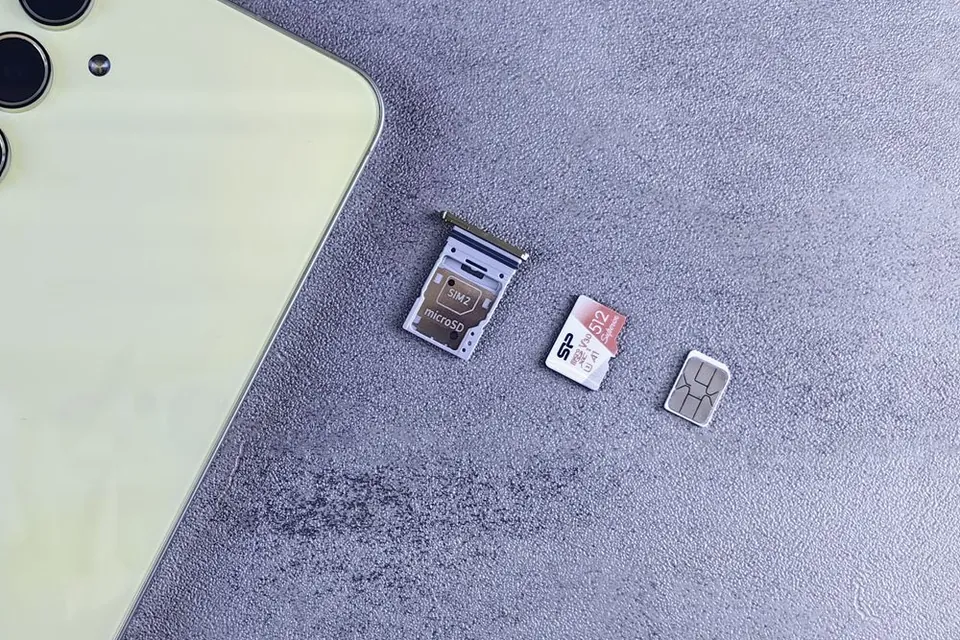
The eSIM wins on convenience; the physical SIM wins on compatibility. Same networks, same kind of plans.1
eSIM
Physical SIM
Buy
Online, any time before
Airport counter, some convenience stores, or online with airport pickup1
Setup
Scan a QR on Wi-Fi
Swap a card
Home number
Stays in the phone as a second line
The home SIM comes out, keep it safe
Phone needed
Unlocked, eSIM capable
Unlocked, with a SIM tray
Risk
Deleting it ends it
Losing the tiny home SIM
US iPhone 14 and later have no SIM tray at all, so for those the question answers itself.12
One insider tip for the physical SIM: with your home SIM out, texts to your home number stop. Bank codes and two-factor logins go nowhere. An eSIM avoids that because both lines live in the phone at once.11
Pocket Wi-Fi or eSIM?
Pocket Wi-Fi if several people or devices share; eSIM if it is just you. A pocket router is a small hotspot you rent, carry and return. LG U+ says up to 10 devices can connect, with real speeds depending on the network and how many are on it.6
A credit card in the passport name. LG U+ authorizes 1,111 won and does not charge it; on a debit card it takes a 70,000 won deposit and refunds it on return.5
The return. You settle and hand it back before you fly.6 Extra days cost extra: LG U+ lists 4,400 won per added day.6
The catch: the router is not a phone number. No one can call it. And when your companion walks off with it, your maps go with them.
Buy the eSIM before the flight or at the airport?
Before, in most cases. Buying online lets you land connected, and the carriers' own pages sell eSIMs online.1, 2, 4 Install it on home Wi-Fi only if your plan's clock does not start at install (see the eSIM rules above).
The airport still makes sense in three cases:
You want a number and a physical SIM. LG U+ sells its data plus voice SIM at the airport only.5, 6
Your passport check failed online. KT says to visit an airport roaming center if online verification does not work.3
Counters at Incheon are on the arrivals floor, 1F. Some open 24 hours, others close at night. LG U+, for one, lists 24-hour and 06:00 to 22:00 counters in both terminals.5 If you land late, check the hours of your carrier's counter before you rely on it.
Do I need a Korean phone number, and how do I get one?
You need one if someone in Korea will call or text you, or if an app verifies you by text. Buy a "data + voice" or "data, call, SMS" plan, then complete the carrier's passport check. Until you do, the number cannot place or receive calls or texts.3, 4
How it works at the carriers, as of Oct 2026:
SK Telecom. Data works before the check. Calls and texts start after the passport is verified, at an airport counter or through the emailed voucher. Foreign passports only.4
KT. You get an 010 number. Incoming calls and texts are free after the check. Calling out uses voice credit: top-ups start at 5,500 won, and the sheet says data plus voice plans include some credit. One number per passport.3
LG U+. You upload your passport. A data plus voice plan can send texts and receive them.5
Outgoing domestic calls cost about 4.4 won per second on these tourist lines.3, 5 A five-minute call to a clinic is around 1,300 won.
Why the passport check is strict now
Korea is tightening phone ID checks. The Ministry of Science and ICT started face verification for new phone sign-ups in stages from July 2026 and said it will tighten the one line per person rule for foreigners.7 In one case, a ring used illegally collected foreign passport copies to open 11,353 prepaid SIMs between 2023 and May 2026.8 So bring the real passport, make sure the name matches, and expect one numbered line per person.
Why do Korean apps reject my foreign number?
Because many Korean sign-ups send a text code to a Korean mobile number, and some go further and check your Korean identity. A tourist line clears the first and not the second.
Text code apps (taxi booking, restaurant booking): LG U+ says its voice plans can receive these codes. Data-only plans cannot.5
Full identity verification (banking, government services): not supported on tourist lines. KT's eSIM page says the same.2, 5
So a Korean number opens more doors, but not every door. For maps and taxis there are now foreign-friendly routes; our Korea entry requirements guide covers the Naver Map passport sign-up and the visitor taxi app.
Q. What about KakaoTalk? Set it up at home, with the number you will keep. Moving an account between numbers mid-trip is where people get locked out, so do it before the flight, on home Wi-Fi.
Data-only or a plan with a number for clinic calls?
If you are in Korea for a procedure, take the number. The price gap is small and the reasons are practical:
Callbacks. Clinics confirm times, move appointments and check on you after treatment by phone or message.
The intake form. You will be asked for a contact number. A Korean one is easier for staff to call.
Delivery and pharmacy runs. Food delivery and courier drivers often call or text on arrival.
Text codes. Booking apps that need a code fail on data-only plans.5
At KT's list prices, 7 days of data alone is 35,000 won, and 7 days with a number is 40,500 won.3 That gap buys you a phone that rings.
Write the number down. Put it in your phone's notes, on the clinic form and in the message where you share your hotel address. For what else to settle at the first appointment, see the Korean clinic consultation checklist.
Q. My stay runs three weeks for recovery. Will a tourist plan last? Yes. KT plans run up to 90 days with extensions, and SK Telecom's plans are built for stays within 90 days.3, 4 Buy the full length up front or extend before it lapses. Our guide on how long to stay in Korea for plastic surgery helps you count the days.
How much does a SIM, eSIM or pocket Wi-Fi cost in Korea?
As of Oct 2026, carrier list prices for unlimited data are about 6,500 won for one day, 27,500 won for five days, 38,500 won for ten and 71,500 won for 30. Plans with a number cost a few thousand won more.3, 5 Prices change, so check the carrier's page on the day you buy.
Days
Data only (KT and LG U+ list)
Data + voice (KT list)
1
about 6,500 won
not offered at 1 day
3
about 18,000 won
about 23,500 won
5
about 27,500 won
about 33,000 won
7
about 35,000 won
about 40,500 won
10
about 38,500 won
about 44,000 won
30
about 71,500 won
about 77,000 won
KT's July 2026 price sheet and LG U+'s tourist SIM page, checked Oct 2026; LG U+ shows one to five days.3, 5 Shown to compare plan types, not to recommend a carrier.
Small print worth reading:
"Unlimited" can have a daily cap. KT gives 11 GB a day at full speed, then 5 Mbps until midnight.3
Days are 24-hour blocks. A "5 day" plan is 120 hours from activation, not five calendar dates.3, 4
Voice credit does not come back. Unused top-up is not refunded.3, 4
Is roaming with my home plan cheaper?
Usually not past a few days. As of Oct 2026, AT&T's International Day Pass is $12 a day and Verizon's TravelPass is $12 a day for Korea.9, 10 A week is $84 before tax, more than KT's 7-day data plan at 35,000 won.3
T-Mobile is the exception worth checking. Several of its plans include basic data in Korea, with some high-speed data on higher tiers and slow data after that.13 Fine for messages, slow for maps in a hurry.
Roaming has one real upside: your home number keeps working for calls, bank texts and two-factor codes. With an eSIM you can have both. Keep the home line on for texts, turn its data roaming off, and use the Korean line for data.11
Is free public Wi-Fi in Korea enough?
Good backup, not a plan. Seoul's city network covers main streets, markets, parks, bus stops, tourist sites and city buses.14 Korea's national public Wi-Fi also runs at bus stops, markets and public buildings.15
How to join:
Seoul: pick SEOUL_Secure and enter seoul as both ID and password, once. It reconnects by itself after that.14
Nationwide: pick "Public WiFi Secure" and enter wifi as both username and password, or "Public WiFi Free" with a tap-through page.15
Where: KTO lists airports, subway and train stations and some bus stops; it points to wififree.kr for spots.1
Skip banking and card entry on public networks. Between hotspots you have nothing, which is exactly when you need a map.
What should I do before the flight?
☐ Phone carrier-unlocked ("No SIM restrictions" on iPhone)11
☐ Bought from the carrier's official page; confirmation email saved offline
☐ Install timing set by when that plan's clock starts3, 4, 5
☐ KakaoTalk and other messaging apps set up at home
☐ Home line kept on for bank texts, its data roaming off11
☐ Passport in hand luggage for the number check3, 4, 5
☐ Your carrier's airport counter and its hours saved, in case
Data gets you around Seoul. A number gets the clinic to you.
Quick FAQ
Pick by plan type, not by brand: data only for maps and chat, or data plus voice if anyone in Korea needs to call or text you.
All three Korean carriers sell both as eSIM or physical SIM.1
Yes, if your phone is carrier-unlocked and supports eSIM.
You land connected and keep your home number in the same phone.1, 11
Same networks and similar plans.
eSIM is easier and keeps your home line active; a physical SIM is the answer if your phone has no eSIM.1, 11
eSIM for one person, pocket Wi-Fi for a group or several laptops.
The router has to be returned, needs a card deposit and has no phone number.5, 6
Before, for data only.
At the airport if you want a physical SIM with a number, a pocket Wi-Fi, or help with a failed passport check.3, 5
Not for maps and chat.
Yes for clinic callbacks, delivery drivers and apps that send a text code.5
Buy a data plus voice plan from a carrier and complete the passport check.
Calls and texts start only after that check.3, 4
Many sign-ups send a text code to a Korean mobile number.
A tourist voice line can receive those codes, but cannot do full identity checks for banking or government services.5
A number, if you are having treatment.
On KT's list a 7-day plan with a number costs 5,500 won more than data only.3
No.
The carriers say country-locked phones will not work; ask your home carrier to unlock it before you fly.2, 4
Dial *#06#.
If an EID appears, the phone supports eSIM.3, 6
It is gone.
KT and LG U+ do not reissue an installed eSIM, so you would buy a new one.2, 6
It depends on the carrier.
KT counts from install, SK Telecom from the QR scan, LG U+ from first data use.3, 4, 5
At the carrier roaming centers on the 1F arrivals floor.
Some counters are open 24 hours and some close at night, so check yours if you land late.1, 5
Sometimes.
KTO says CU, GS25, 7-Eleven and Emart24 sell physical SIMs, but stock varies by branch.1
Yes for a number, and for pocket Wi-Fi rental.
Plans with a number need a passport check, LG U+'s SIM page asks for a passport upload, and rental desks want the passport too.4, 5, 6
Mostly.
KT, for example, gives 11 GB a day at full speed, then 5 Mbps until midnight.3
Up to 90 days on KT with extensions.
SK Telecom's plans are for stays within 90 days.3, 4
Rarely for a week.
At $12 a day on AT&T or Verizon, seven days is $84 before tax.9, 10
As a backup.
SEOUL_Secure covers streets, parks, bus stops and buses, but there are gaps between hotspots.14
Showing 5 of 20
Electricity & Communications (Mobile Phone Rentals and Roaming Service; SIM Card Purchase; Internet Access). VisitKorea, Korea Tourism Organization, page updated September 11, 2026. Link
eSIM. KT Roaming, official English page (plans, caution notes). Link
Korea SIM / eSIM service manual (서비스 이용 매뉴얼). KT, July 2026 (in Korean). Link
eSIM Service: eSIM (Data, Call, SMS). SK Telecom Roaming, official English page. Link
Korea SIM Card: Unlimited Data + Voice. LG U+, official English page, checked October 2026. Link
FAQs. LG U+ Korea SIM, official English FAQ, checked October 2026. Link
휴대전화 개통 시 안면인증, 내달 6일부터 단계적 시행 (Face verification for phone sign-ups phased in from July 6). Ministry of Science and ICT via Korea.kr, June 30, 2026 (in Korean). Link
10월 1일 도입 예정 '안면인증'…외국인 명의 회선 대응 과제 (Face verification from October 1 and lines opened in foreigners' names). IT Daily, September 29, 2026 (in Korean). Link
International Day Pass. AT&T, checked October 2026. Link
TravelPass Countries. Verizon, checked October 2026. Link
Use eSIM while traveling internationally with your iPhone. Apple Support. Link
Remove or switch the SIM card in your iPhone. Apple Support. Link
International roaming services. T-Mobile Support, checked October 2026. Link
서울 무료 와이파이 SEOUL_Secure 마음껏 이용하세요 (Use Seoul's free Wi-Fi, SEOUL_Secure). Seoul Metropolitan Government, updated October 16, 2026 (in Korean). Link
공공와이파이 덕에 통신비 절반으로 뚝 (How to use Korea's public Wi-Fi). Korea.kr policy news, May 31, 2021 (in Korean). Link